SiDiary also runs in your practice network
Data storage location', in which of your shared folder in the network the patient data should be stored.
The stored data can be viewed on any computer in the network, and it's also easy to integrate the stored data in your backup strategy.
...
»»»
SiDiary supports users of insulin pumps
A therapy change or a new base adjustment with a pump is done ideally at home because there you have all the "real" conditions. Therefore, it is pretty good to provide your data contemporary to your doctor. With your electronic logbook, a simple change can be easily d
»»»
SiDiary supports blind people with diabetes
SiDiary supports kids & teens with diabetes
If your child is away from home and tracks a critical reading, the parents can get informed with a direct E-Mail message on their mobile phone. They can call back with instructions on how to handle this situation. The trusted person and the E-Mail address, alo
»»»
SiDiary supports women with gestational diabetes
This type of diabetes is formed back in most cases, but the mother has to live with an increased risk to getting a diabetes type 2.
The higher blood glucose levels are transfused through the umbilical cord to the baby, that now starts to produce more insulin and to store the excessi
»»»
SiDiary supports people with type 2 diabetes
Little diabetes software are providing the possibility to track pills as well as insulin together as a combination. With SiDiary you can track information, when you have taken your pills, how much of them and also when you took your insulin shots.
This means that for changes
»»»
SiDiary supports people with type 1 diabetes
This means that they must inject a long acting insulin for their basal need and additional injections with a fast acting insulin type for every carb intake.
- Before every carb intake
- At the evening before going to bed
You are enjoying a meal in your favorite restaurant and estimate
»»»
The intelligent diabetes management
SiDiary makes the management of diabetes so much easier. Data capturing is a cinch and analysis will help to improve your therapy. We have included great new features with version 6 to help you to get started in the easiest way ever possible, even for computer rookies!
»»»
Service -
SiDiary Tour -
Sync App with PC -
SmartSync Settings
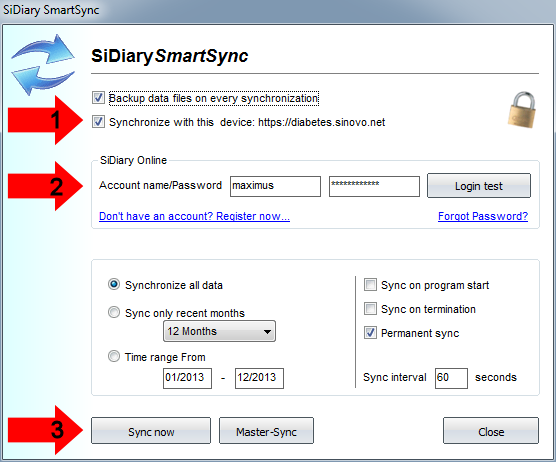
How to get data from the App to the PC version: SmartSync-Settings
In the adjacent screen you can make your entries:
1. With a checkmark you determine, that with this device your data shall be aligned (synchronized)
2. Please enter your username/password from SiDiary Online here
3. With a click at this button you can start the sync process manually.
You should use the master sync button with caution. With a master sync all data on SiDiary Online will be deleted and replaced with the current data from your PC
SiDiary received several top ratings »»»
SiDiary mobile and at home »»»
SiDiary reads more than 300 devices »»»
This website uses cookies to provide the best experience on our website. You can change your cookie settings at any time. If you continue without changing the cookie settings, we assume that you agree that this site may store cookies on your computer.
Ok, continue